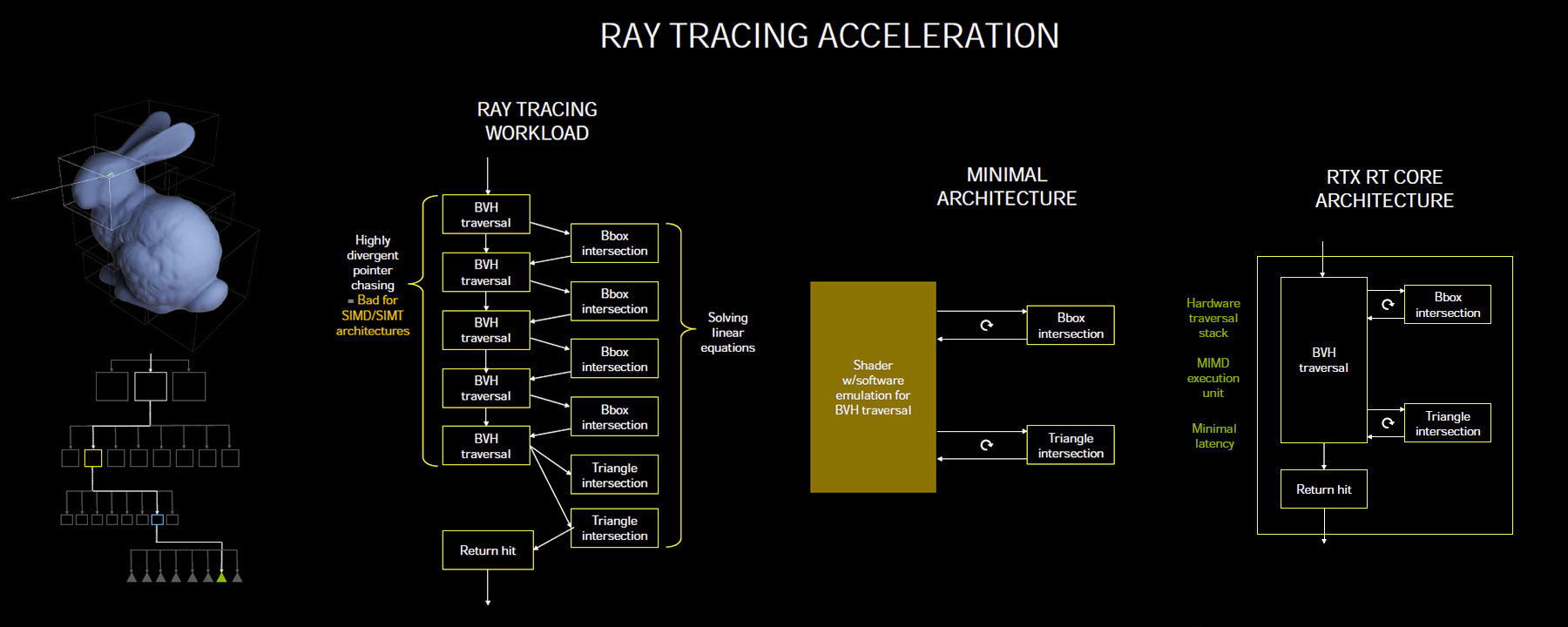
With Ampere, NVIDIA introduces its 2nd generation RT core that aims to improve raytracing acceleration, as well as new effects, such as raytraced motion blur. An RT core is a fixed-function hardware component that handles two of the most challenging tasks for SIMD programmable shaders, bounding volume hierarchy (BVH) traversal and intersection; i.e., calculating the exact point where a ray collides with a surface, so its next course can be charted. Typical raytracing workloads in a raster+raytracing hybrid rendering path involve calculating steps of traversal and intersection across the BVH and bounding-box/triangle intersections, which is a very unsuitable workload for typical GPUs because of the nature of memory accesses involved. This kind of pointer chasing doesn’t scale well with SIMD architectures (read: programmable shaders) and is better suited to special fixed-function hardware, like the MIMD RT cores.
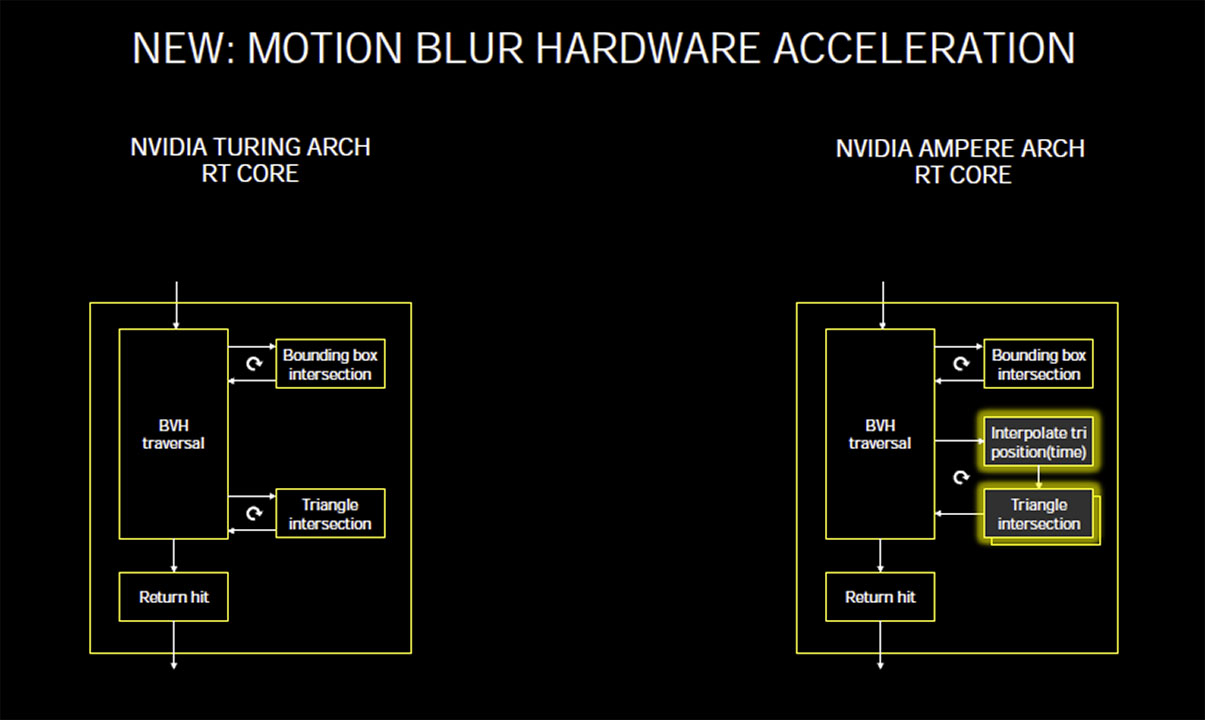
Without taking names, NVIDIA pointed out that a minimalist approach toward raytracing (possibly what AMD is up to with RDNA2) has a performance impact due to overreliance on SIMD stream processors. NVIDIA’s RT cores offer a completely hardware-based BVH traversal stack, a purpose-built MIMD execution unit, and inherently lower latency from the hardware stack. The 2nd generation RT core being introduced with Ampere adds one more hardware component.
Ampere introduces a new logic block that interpolates triangle positions along a time scale, in coordination with the triangle intersection unit. NVIDIA tells us that this is useful in generating motion blur effects in real-time raytracing. Our take on this is that NVIDIA is, rather, implementing this as performance optimization for raytracing. As very little will likely change in two frames, there is no need to recalculate all the results for the following frame after all the ray intersections for the current frame have been calculated—the player moved or changed the camera, and objects in the world are positioned only ever so slightly differently. We suspect NVIDIA paired a motion-estimation algorithm with RTX that remembers the last intersections as “good candidates” and checks them early on in the whole process, which can lead to a valid result early in the test and means many entries in the BVH don’t have to be processed at all.
Impressive, some interesting information here though pretty high level but very fascinating.
Going to be interesting to see what else is going to be revealed closer to the GPU’s launch date mid-September plus the reviews and user impressions too.
And then the whole lot of back-end and developer related functionality and deeper info on the hardware update like these bits of info which even if I don’t fully understand it it’s incredibly fascinating to read up about how this works and what it’s utilized for and what it can be used for.
Because it eliminates 1 frame of CPU/GPU parallelism. Usually the CPU works 1 frame (or more) ahead of the GPU and the GPU is kept from going idle when the CPU struggles. With ultra-low latency mode enabled, the GPU and CPU are within 1 frame of each other, if one struggles the other will also (instead of the usual 1-2 frame cushion).
When the GPU always needs to complete its work before the CPU can move on to the next frame, you need a pretty beefy GPU or your framerate is going to plummet.
Ultra Low Latency mode will induce stutter unless your GPU’s already significantly more powerful than it needs to be (i.e. CS:GO). Thankfully, most highly latency sensitive games are also very easy to draw and this works out in the end
Very interesting reading. I think you are on the money there.
Somethings come to mind and worried me on the PS4/XO launched: The Unified Memory Architecture.
We all know that most games are developed for consoles and later converted to PC, some exceptions apply. And while all consoles went to the x86 route, the unified memory means that (at the time) console have much more access to “VRAM” than PCs.
For example, a PC with 8GB RAM and a 780 with 2GB VRAM, needs to read from HDD/SDD > RAM > VRAM. You need to create some mechanism on open worlds games like texture streaming, so the 2GB VRAM on the 780 have what they need now instead of dumping “everything” there.
Arkham Knight was one of the games where this became more prevalent to me. A game that run pretty fine on consoles, and collapsed on modern PCs at the time.
Today we live on a different paradigm, newer VCARDS have 6G to 8GB VRAM and you can easily find parity to console game engines.
The second thing is , as your piece described, consoles are trading VRAM Budget to IO SPEED, using solution that demand less from the CPU and increase the read speed. Almost as the consoles needed to do what PCs did in the past: more streaming. You have enough IO speed do stream you assets instead of brute forcing allocating “everything” (exaggerating here) on VRAM.
Now on PC we have a different issue, and while nVidia hinted a solution (RTX I/O) we have some problems until this will became mainstream:
1- Intel dragging its feet on PCI GEN4 Boards. Until now I never see real cases of games using all bandwidth of PCI GEN3, but I believe this new paradigm will change things and PCI GEN4 will be necessary.
2- AMD (Radeon group) need to have a similar solution and seriously need to enter the RT market. It’s odd to me, since in rasterization nVidia killed AMD, I was under the impression that in all the AI stuff, AMD where really competitive.
So I came to realize having two different memory sticks isn’t the brightest move. SO I am replacing my 1866Mhz with G.Skill RipjawsX 2133Mhz ones. that match my other G.Skill Ares sticks clocks. I looked at both on G.Skill website and they are pretty much same to a tee in clocks and speed by the looks of it. So hopefully that will help stabilize my memory and I can actually use 2133Mhz instead of downclocking my G.Skill Sticks to 1866Mhz as I am doing right now. Looked at specs of my memory and it seems the ripjaws are just basically different heat headers.
They also have same voltage and everything as well that they use.
Anyone got any comments on that? Was the wise move? I also will be able to clock at 2133Mhz now with those memory sticks once they arrive and I put them in my system.
@Darktalon People’s reaction to that VRAM ResetEra thread you created is surprising. It’s like they actually assume that the RTX 3080 with its 10 GB of VRAM is supposed to last the whole next-gen console lifetime of like 6-7 years – and be able to play all games maxed out even many years from now just fine if it had a few GBs more VRAM on it…
The RTX 3080 with its 10 GB of VRAM will last fine somewhere like 2-4 years before the VRAM becomes the limiting factor – and technologies such as DirectStorage will only expand its relevance further than if DirectStorage wasn’t a thing.
But in terms of performance at maxed out settings at native 4K in future high-end games, I imagine we’ll see the bottleneck become the actual raw performance of that card before the 10 GB VRAM becomes the bottleneck.
It’ll be interesting to see what the future holds regardless.
Should work depending on CPU and motherboard but bios updates can greatly improve compatibility and newer hardware even for DDR3 should be capable of above 1600 MMT I think is how that’s called / 800 Mhz. (Double data rate.)
XMP’s can be a bit problematic on AMD up until Zen+ I think it was and some of the newer AGESA updates as well, Intel should work but double check the recommended config and channels and I assume 8 GB modules are single rank so that won’t be a issue either.
(Can be a bit of a process for AMD and DDR4 with all of this, think it’s still pretty straightforward with Intel though but AMD has improved though some board partners have a bit iffy compatibility.)
This is 4th Gen board and I matched memory specs with my Ares Series Sticks. So I don’t have to downclock to 1866mhz anymore. Should be able to handle it fine. My board can support up to 3000Mhz speeds for memory up to 32GB.
Basically i7 4790K is my CPU. And I use XMP Profiles right now. It does detect when Ram Sticks have been switched out. So hopefully this helps with my Memory situation be a bit more consistent or rather matching speeds and not such high difference in Timings. That’s why I chose same brand and basically same type of sticks or as close and between the Ares ones in my current setup I found that the ripjawsX one has an exact timing setup one as well.
A bigger part of the PC Era community left or got banned during waves such as the early Epic Games Store discussion and some of the prior moderation also wasn’t very PC invested though that can still be a bit of a thing, I believe that’s one of the causes why some former bigger names like Durante eventually left and then we got Meta Council from some of the prior Era members and a number of other users as that site has grown.
It’s good for news and updates but the discussion can be very uninformed or biased perhaps or whatever to call it, there’s a few bigger enthusiasts and more knowledgeable users still posting though.
Long as the board data is good and the XMP’s at least fairly thorough it’s usually not a issue, memory modules and specifics can help but mostly for fine tuning assuming the data loaded into the bios is set properly.
Primary timings and voltage are usually correct though sometimes there’s a bit of overshoot or the motherboard profile is a bit conservative though DDR3 standard 1.5v I think it is should be pretty set by this point.
Some testing and usage over time and it should be easy enough to see how stable it is, no random windows error events or such.
Plus by this point the memory modules should all be fairly well binned and mature especially the more known non outright budget brands.
EDIT: Oh so it’s around 1.6v on some modules, interesting.
Nice too, early DDR3 could go up to over 2.0v which is pretty funny and then it went down to around 1.5v with DDR4 hitting 1.25v to 1.35v although some Samsung binned modules handle up to 1.5v and scale almost linearly but it’s mostly for additional timing tweaking and further overclocks beyond the XMP.
Yeah even if it’s the same speeds mismatched memory modules can be a problem.
It’s a nice boost though from the stock 1333 for DDR3 and for newer games I expect past 1800 to make a nice little performance gain too.
Impressive to hear that the motherboard and hardware can seemingly support up to almost 3000 too though I assume it does get a bit iffier past 2133 or 2400 but newer motherboard hardware and CPU’s might have made things better than what I remember.
(2133 was the start of DDR4 speeds as I recall.)
The X79 I used held up well, Asus eventually split it into a Black Edition ROG model for the newer 4000 series CPU’s only before the newer 5000 series CPU’s and the X99 motherboard leap to new tech but it had it’s own share of problems and compatibility.
(Standard non-black edition could also support the 4000 CPU series through bios but was not guaranteed to have the full motherboard functionality like PCI Express 3.0 compatible not just 3.0 readiness.)
Shame Asus is starting to look like they’ve dropped in quality since then but others like MSI and Gigabyte have picked up although not without some flaws of their own both on AMD and Intel boards from what I’ve been reading up on.
Looks like Asus got caught using a older binning on the 2.5 GB Intel network chips with known problems recently plus something around audio hardware quality over competing brands but the Realtek audio chips and all that is a maze of different parts and supported extras.
EDIT: Well there was the Asus soundcard “support” is a thing as well even in the earlier years come to think of it and also even after they had more custom software and audio hardware in these later devices, suppose support is a bit relative depending on what they were doing here ha ha.
This is my current board but I swear someone customized it entirely. Not sure if its the true board b/c mine is pure white all over it except for slots and such. Seems like some sort of top that covers the board entirely. https://us.msi.com/Motherboard/z87-g41-pc-mate.html
Oh cool, eVGA already confirmed there will be an RTX 3090 K|NGP|N, but no release date (or price) given :-\
I want to get something more powerful (than my RTX 2080 Ti K|NGP|N) before Watch_Dogs Legions so I can actually turn on RayTracing and enjoy a game rather than a slideshow. But… I also want the K|NGP|N card. I might settle and just buy it as a launch title for Xbox Series X and wait for the 3090 KP later.
it will continue to use a hybrid AIO cooler as with the RTX 2080 Ti variant, but with a massive 360 mm radiator and three 120 mm fans for the behemoth GA102 die and accompanying power delivery solution.
These cards are designed for EXTREME overclocking. You know how most NVIDIA cards top out at like 112% for power limit? K|NGP|N cards go up to 144%
They’re intended for LN2, but recently have been bundling them with cooling solutions that make them practical for stuff other than world-record overclocking