I just got Special K for the first time the other day. I like it a lot. However, I’ve been having an issue with my controller. I had this issue when the game first came out on PC. I have an Elite Series II with the Xbox Wireless Adapter.
Basically, when it first came out, my controller didn’t work at all. I had figured out a workaround (completely lost by now), but then it got fixed. Now, with Special K injected, the problem kind of returned. The controller works just fine when I start the game, but if the controller turns off from timeout, I can’t turn it back on with the game running. It turns right off after lighting up for a moment. Restarting the game fixes this.. Below is what I’ve tried so far:
Turned off Steam Input
Turned off all other inputs besides xinput in Special K OSD
Turned rumble to minimum in Xbox Accessories
Turned off rumble in Special K OSD
Tested normal Xbox Series X|S controller, same issue
Turned rumble completely off in Xbox Accessories, same issue
No way to turn off auto-shutoff for controller
Set FixDInput8EnumDevices to falsein SpecialK.ini under the game profile
This resulted in the game going to extremely low FPS after the controller was disconnected. The controller did turn back on and stayed on for a bit, but still could not control the game. I then turned it off and back on once more, and it went back to the original behavior.
The only thing I have not tried is running the controller completely wired. Anyone have any ideas?? I would love to keep playing this game with Special K, but I end up having to restart the game to fix it.
the game without sk stutters when the controller is disconnected and reconnected (happens with wireless and usb; either one)
sk prevents those stutters. though, as you noticed, yes with sk currently the game no longer detects the controller if it gets disconnected (you’d have to restart the game…)
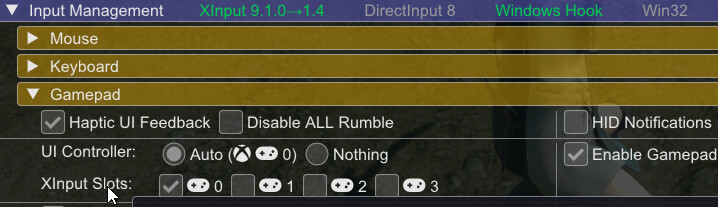
you could change that behavior in this game by unchecking the xinput slot 0 in sk’s control panel:
normally having the xinput slot checked actually allows games to keep detecting the controller (there are other games that without sk no longer detect the controller after their timeout… until a game restart); however, i was just testing this on nier replicant and for this game i actually needed to uncheck the xinput slot 0 in order for the game to detect the controller again without restarting the game.
sk keeps force checking that xinput slot 0 each time on game launch though, so you’d have to manually uncheck it each time you launch the game (maybe this’ll be changed later. the project is on hold for now as far as development/updates…)
i didn’t notice stutters with the xinput slot unchecked, so it’s probably fine to keep it unchecked.
in short:
the workaround i found, to allow nier replicant to detect the controller again after it has disconnected (and without restarting the game), is to UNCHECK sk’s xinput input slot 0 – but have to do this on each game launch… sometime before the controller disconnects. Try it out.
huh ? you sure you put it in the correct place ? i tested that and it worked for me
make sure you don’t have that line twice. maybe you have one [Input.XInput] with Enable=false that you added another one with Enable=true…
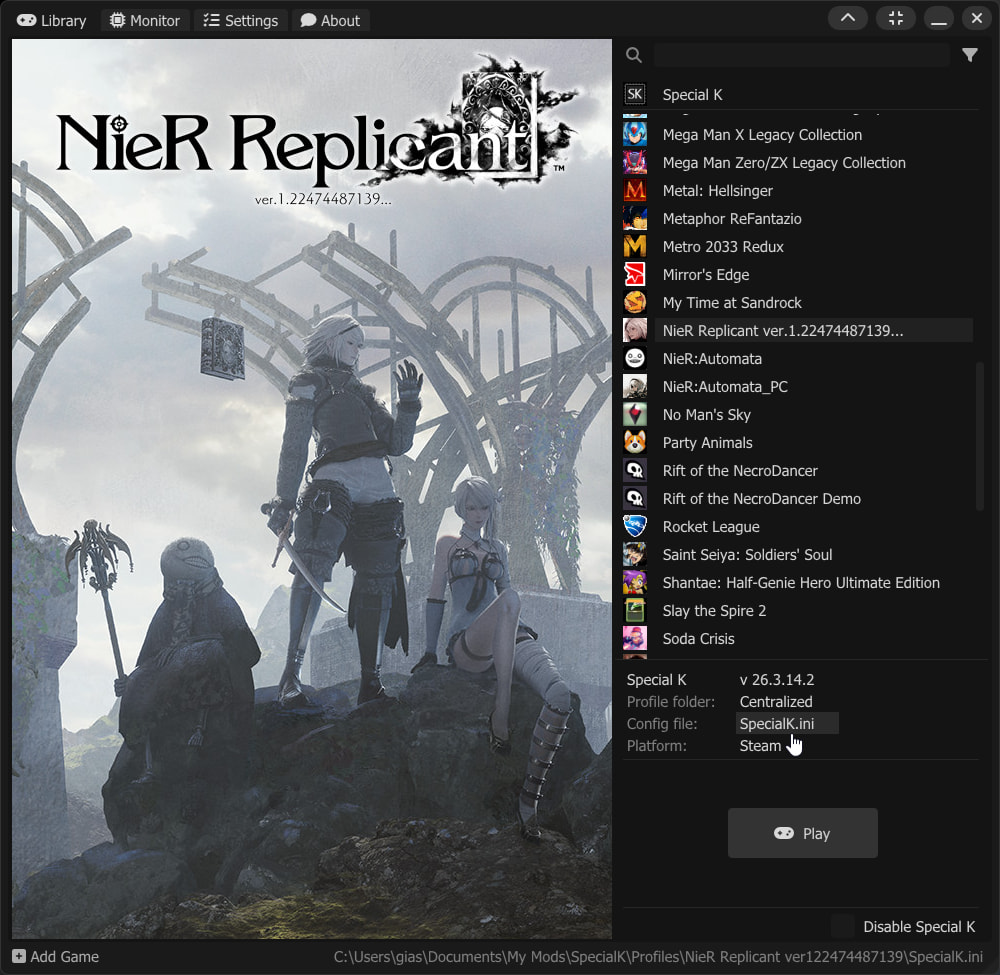
make sure it’s just one and that you put it in the correct sk config for the game. it’s possible to have more than one config file… at least if you first launched with global sk injection and later switched to local…
the “config file” section in the special k injection frontend app would normally point to the correct sk config for the game: